Linux is an free and Open-source operating system with high security. Linux is multi user based OS.
OS: Operating System
An Operating System (OS) is a software that acts as an interface between computer hardware components and the user. Every computer system must have at least one operating system to run other programs. Applications like Browsers, MS Office, Notepad Games, etc., need some environment to run and perform its tasks
TYPES OF OS:
Key Features of Linux:
Linux follows the open-source model.
Linux has multiuser and multitasking capabilities.
Security features.
Linux is used for servers, embedded systems, supercomputers, etc.
LINUX OS DISTRIBUTIONS:
Many of the users taken the Linux OS and modified according to their requirements and released into the market with different names called Linux distribution.
RedHat
Ubuntu
Debian
Centos
Fedora
OpenSuse
Kali
Linux
Amazon Linux
Rocky Linux
HISTORY:
On Sep 17th 1991, Linus Torvalds a student at the university of Helsinki, Finland, He released the fi rst version of the Linux kernel, known as Linux 0.01, as open-source software.
The Linux kernel is written in C language.
He wrote this program specially for his own PC. Initially, he wanted to name it 'Freax', but later it became 'Linux'.
Today, supercomputers, smartphones, desktops, web servers, tablets, laptops, and home appliances like washing machines, DVD players, routers, modems, cars, refrigerators, etc., use Linux OS.
KERNEL:
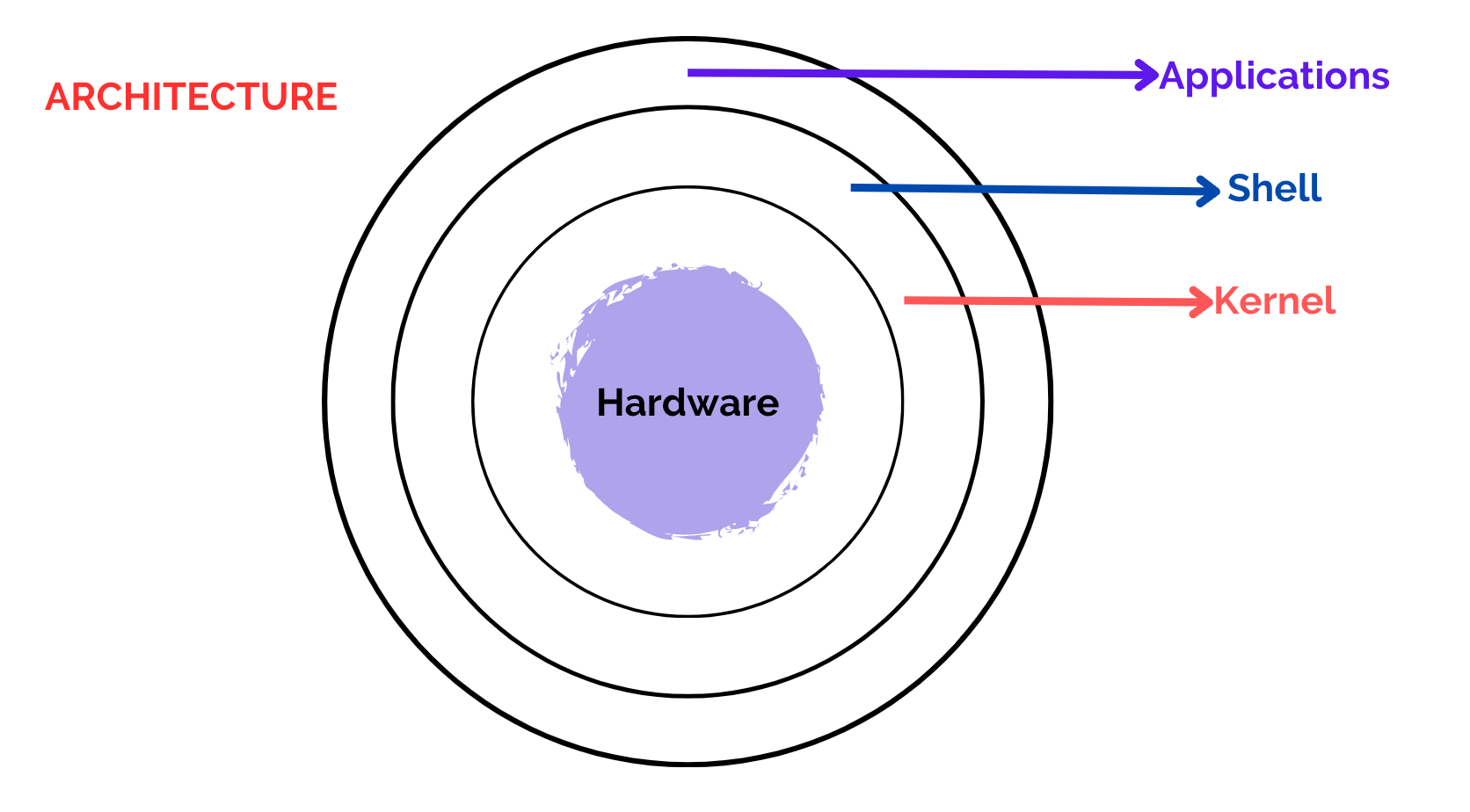
It is the core or the heart of the operating system. It's the central part that manages and facilitates communication between the computer's hardware and software.
SHELL:
A shell that allows users to interact with the operating system. There are two types of shells. Command Line Interface (CLI):
Executes the command provided by the user in the form of a command and displays the output in the terminal.
Executes the process provided by the user in a graphical way and displays the output in the graphical window.
COMMAND:
It is an instruction/request given to the operating system by a user.
It tells the computer to perform a particular task.
TERMINAL:
It is a text-based interface that allows you to interact with the operating system by typing commands.
It's a way for you to communicate with the Linux machines.
LET’S DIVE INTO PRACTICAL SESSION:
By default, we are in ec2-user, but if we want to perform any action, we should be in root user
because, root is the ultimate king of Linux, root has full permissions, so that we can run any command anywhere.
To login as root user: sudo -i
Here sudo : super user do
to logout from root user and go back to ec2-user: exit
In Linux we have different types of commands
SYSTEM COMMANDS
HARDWARE COMMANDS
FILE COMMANDS
PERMISSION COMMANDS
USER COMMANDS
SEARCH COMMANDS
NETWORKING COMMANDS
SYSTEM COMMANDS: Used to get system information
uname : used to get type of OS
uname -r: used to get kernel version of our OS
uname -a: used to get full info about OS
clear: this command is used to clear the clear (or) you can use ctrl + l as a short cut
uptime: used to get since how long our system is in running state
uptime -p: this will give only time
hostname: used to get private dns name of our system
hostname -i : used to get private Ip of our system
hostnamectl set-hostname “swiggy”: used to change hostname
Ip addr : used to get private IP
Ip route: used to get private IP
ipconfig: used to get private IP
date: to get todays date
timedatectl : used to get timezones
timedatectl set-timezone Asia/Kolkata: used to change Time zone to IST
who: used to see how many users have been login into your system
whoami : used to see the current user.
SOME EXTRA COMMANDS FOR PRACTICE:
date +” %d”: used to get only date
date +” %m”: used to get only month
date +” %y”: to get only year
date +” %H”: used to get Hours
date +” %M”: used to get Minutes
date +” %S”: used to get seconds
date +” %D”: it will return todays full date (02/01/24) FORMAT: mm/dd/yy
date +” %F”: it will return todays full date (2024-02-01) FORMAT: yyyy-mm-dd
date +” %A”: used to get day of a week date +” %B”: used to get month of a year